Measure the current search
Time common tasks such as finding an order, checking a BOM or locating a document. Capture how often each task repeats.
 Free pilot
Give engineering, procurement and operations teams time back. Bridges brings enterprise information into their current workflow, helping reduce the repeated searches that add up across the working day.
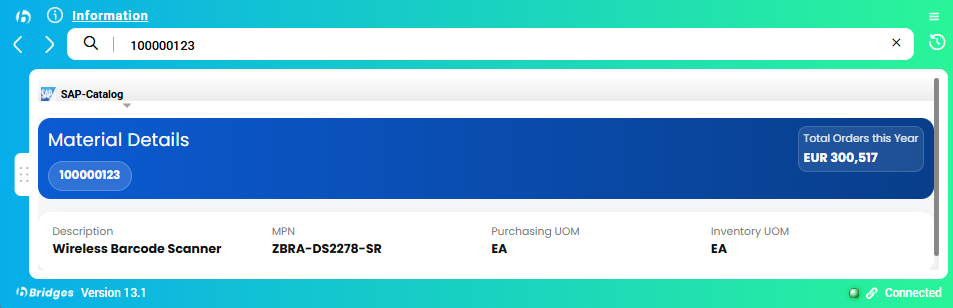
Information in context, with links back to the systems your teams already use.
Estimate the value of time your team could recover. Adjust the assumptions to reflect your organization, then validate them in a focused pilot.
Value of time recovered + lower license costs
5,500 staff hours recovered per year under these assumptions.
Combined annual benefit = value of recovered time + annual license cost difference. Time value = users × minutes saved ÷ 60 × workdays × hourly cost. License savings = users × (other annual license rate − Bridges annual rate). License savings already include the difference between the two subscriptions. Additional annual costs are shown separately and excluded from this benefit. Recovered staff capacity is not guaranteed cash savings. The comparison assumes the viewer licenses can be replaced. Validate time savings, license replacement and full costs in a pilot.
Time common tasks such as finding an order, checking a BOM or locating a document. Capture how often each task repeats.
Run the same tasks in a pilot. Compare time, successful results and usage with the original process.
Translate the results into recovered capacity and compare the value with the full solution cost before a wider rollout.
Engineering, procurement and operations often need the same information from different places. Bridges connects those sources in one view, so a question can start with the text on your screen.
Start with the information people need most. Extend the connected sources as new needs emerge.
Look up suppliers, purchase orders, invoices, inventory and spend from a single reference.
Find item details, connected documents and BOM relationships. Follow a part into its wider product context.
Find procedures, forms and technical content using document text together with attribute filters.
Connect customer records, contact information and logistics data to everyday decisions.
Search document content alongside manufacturer, status and other attributes. AI document search adds a way to ask questions in natural language and review the supporting files.
Useful for technical specifications, product documentation and internal knowledge.
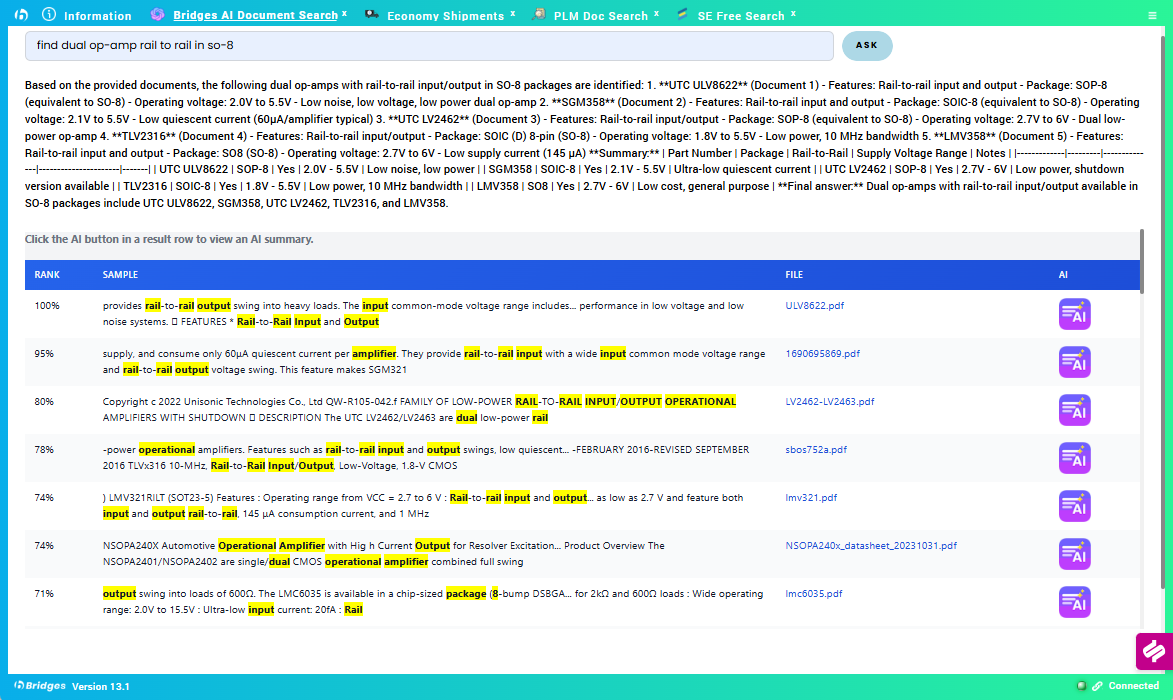
Bring AI integration and MCP (Model Context Protocol) into your enterprise environment. Connect AI assistants to corporate information through Bridges, with deployment inside your firewall.
Discuss AI & MCP integration ↗Use connected enterprise data and document content to support questions, research and everyday decisions.
Bring corporate knowledge into AI workflows through a standard connection between assistants and enterprise sources.
Plan the AI model, MCP access and connected sources around your organization’s permissions and security requirements.
Bridges combines a Windows desktop client with a secured search server. Connect corporate applications, databases, document folders and external APIs while controlling access by user and group.
Try Bridges with a free pilot built around your workflows. Implementation can be completed within a few weeks, with scope, connected sources and access agreed together.
Choose the questions your team needs to answer and see a tailored demonstration.
Connect a focused set of data sources at no pilot charge. Let your team test the workflows and measure time saved.
Move from the agreed pilot scope to rollout within a few weeks, then expand to additional sources and workflows.
The pilot is free. Final implementation timing depends on the agreed scope, system access and integration requirements.
Let’s build an ROI case around your workflows and validate it in a pilot.